Stop Wasting 4 Hours on a 60-Second Video · DaVinci Resolve 18 & 19

Turn 4 Hours of Tedious Editing
Into 60 Seconds of Automated Magic.

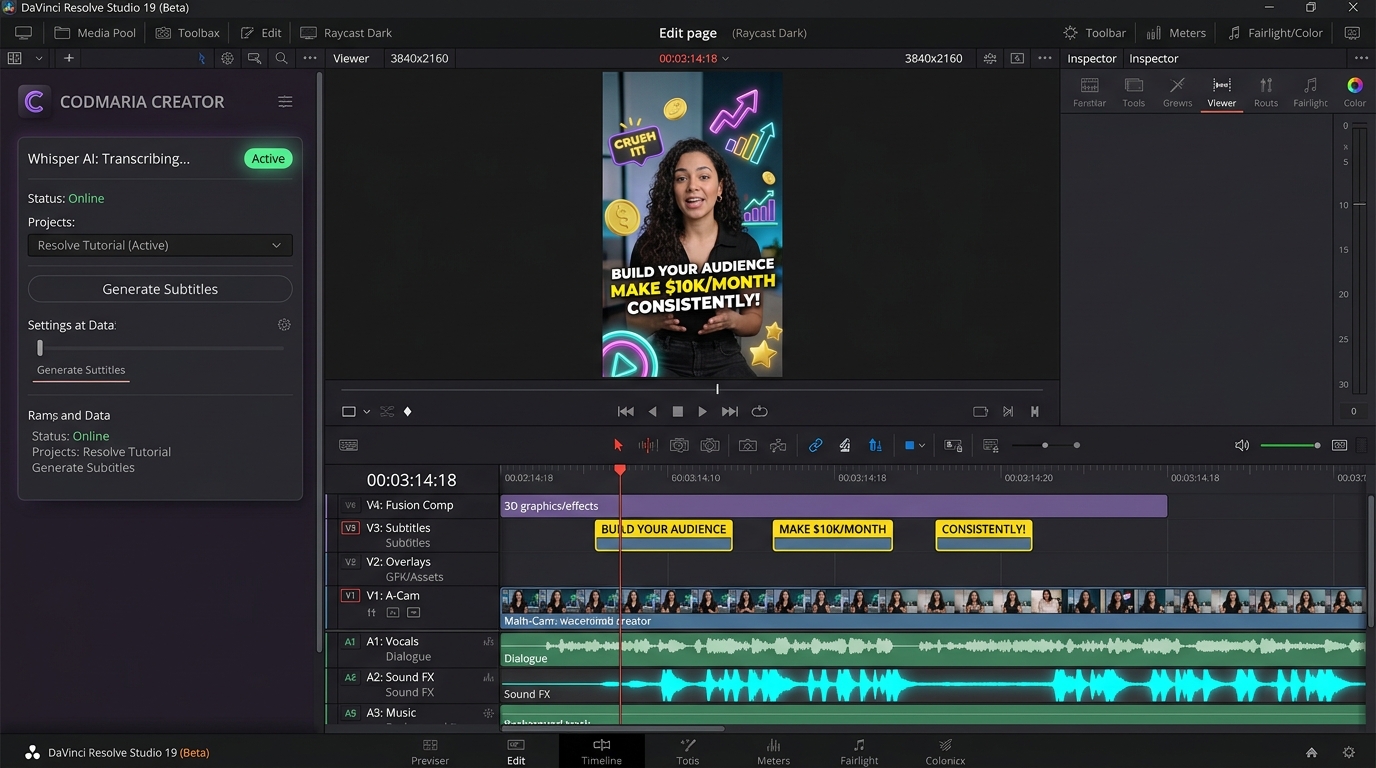
Stop manually slicing words, keyframing animations, and hunting for sound effects. Codmaria Creator generates viral subtitles (Hormozi, MrBeast, Ali Abdaal), 3D graphics, and pre-synchronized track A2 SFX natively on your DaVinci Resolve timeline in 1 click. Save 18+ hours every single week.
Try Interactive Demo
Save 18+ Hours / Week
Lifetime License (Zero subscriptions)
Local GPU Whisper AI (0 latency)
14-Day Money Back Guarantee
Whisper Large-v3 Local · 99.4% Accuracy
Synchronized Track A2 SFX Generated Automatically
DaVinci Resolve Studio 19 — Codmaria Creator Suite [Native GPU Engine]
GPU ACCELERATED
DaVinci Resolve Studio 19 running Codmaria Creator plugin with subtitles, 3D graphics and audio waveforms
🔥 Hormozi Pop (Yellow & Cyan)
⚡ MrBeast Bounce Zoom
✨ Ali Abdaal Minimalist
💚 TikTok Glow Karaoke
🤖 Cyberpunk Glitch
🎬 Documentary Serif
💥 Comic Pop Bubble
💻 Dev Tech Mono
🔥 Hormozi Pop (Yellow & Cyan)
⚡ MrBeast Bounce Zoom
✨ Ali Abdaal Minimalist
💚 TikTok Glow Karaoke
🤖 Cyberpunk Glitch
🎬 Documentary Serif
💥 Comic Pop Bubble
💻 Dev Tech Mono
⚠️ The Brutal Reality of Video Editing

Are You Still Spending 4 Hours on a 60-Second Video?

The dirty secret of short-form video: 80% of your editing time isn't creative storytelling. It's repetitive, soul-draining grunt work that burns you out and puts a hard ceiling on your income.

⏱️ The Time Sink
4.5 Hours Lost

Spent manually slicing text clips word-by-word, adjusting start/end keyframes, and searching through 50 sound effect folders for whooshes and impacts.

📉 The Weekly Drain
18+ Hours / Wk

Over 72 hours per month—literally an entire second job spent doing mechanical, mind-numbing clicking that a machine can execute in 60 seconds.

🔒 The Income Ceiling
Max 2-3 Clients

Because each short video takes half a day to polish, you can't scale your output or take on high-ticket clients without hitting complete physical burnout.

❌ The Exhausting Way (Manual Grunt Work)

4.5 Hours Per Reel

Drained energy, missed upload deadlines, and constant creative fatigue.

  • Manual Subtitle Slicing (90 mins):

    Listening to audio frame-by-frame, splitting 150+ Text+ nodes, and adjusting in/out points by hand.

  • Tedious Keyframing (60 mins):

    Manually animating pop-in zooms, neon glows, and rotation keyframes for every emphasized word.

  • SFX Folder Hunting (45 mins):

    Digging through messy hard drive folders for whooshes and dragging them one-by-one to the audio track.

  • Exporting to Buggy Cloud Apps (40 mins):

    Uploading huge video files to CapCut or Submagic, losing 10-bit Rec.709 color grades, waiting in queue, and paying monthly fees.

🛑 Output: Only 2 to 3 videos a week before feeling completely drained
⚡ The Codmaria Way (Native GPU Automation)

60 Seconds Total

Full retention editing built natively on your timeline in one single click.

  • Instant Local Whisper AI Transcription:

    Transcribes your timeline directly on your GPU (NVIDIA / Apple Neural Engine) with 99.4% word accuracy in seconds.

  • Sequential Animated Fusion Presets:

    6 viral styles rotate automatically across your phrases with zero manual keyframing or plugin bloat.

  • Pre-Synchronized Track A2 SFX:

    184 curated viral whooshes, clicks, and risers are automatically placed on track A2 to hit every punchline.

  • 100% Native Studio Quality (Zero Color Loss):

    Stays inside DaVinci Resolve. Full 4K 10-bit color preservation, zero web compression, zero monthly subscription fees.

🚀 Output: Edit 5x more content or take on 3x more paying clients with zero burnout

Edit Just 4 Videos a Week? You Get Back 16 Hours of Life.

That is 64 hours every single month to shoot better footage, close bigger clients, or simply take the weekend off.

4 Exclusive Superpowers

The Fastest Creator Suite Built for DaVinci Resolve

No more exporting your footage to CapCut or Premiere. Everything is generated natively right on your timeline.

100% Local Whisper AI on Your GPU

Automatically transcribes speech across 99+ languages with surgical word-by-word accuracy. Runs directly on your hardware (NVIDIA RTX / Apple Silicon Neural Engine), with zero cloud uploads and zero fees per minute.

Automatic 3D Graphics Keyword Detection

Codmaria analyzes your speech and detects high-impact keywords ("money", "growth", "time", "fire") to place animated 3D assets on track V3 at the exact frame.

Pre-Synchronized Track A2 SFX

Sound design doubles audience retention. Whenever an emphasized word or 3D sticker appears, the engine automatically places sound effects (whooshes, risers, pops, cash registers) on track A2.

100% Native: Zero Color Loss & Full 4K Quality

Stop exporting to external web apps that destroy your color space (Rec.709 / DaVinci Wide Gamut) or recompress your bitrate. Everything in Codmaria consists of native Fusion compositions and fully editable text layers.

Interactive Demo

Preview Viral Styles in Real-Time

Click through the presets below to see dynamic subtitle styling, 3D graphics, and sound design in action.

🔥 Hormozi Viral Pop
Heavy bold font with black stroke, vibrant yellow and cyan.
Active
⚡ MrBeast Bounce Zoom
Pop scale animation with high impact red active word.
✨ Ali Abdaal Minimalist
Clean translucent dark container with refined typography.
💚 TikTok Neon Glow
Glowing karaoke word-by-word illumination for Shorts and Reels.
STYLE: HORMOZI POP
💰
MULTI PLY YOUR RESULTS
🔊 SFX: cash_register.wav Track A2
Creator Workflow

From Raw Footage to Viral in 4 Steps

No complicated tutorials required. Designed for creators and editors who value every minute.

1

Drop Your Clip

Place your talking-head or interview footage on track V1 in DaVinci Resolve.

2

Launch the Plugin

Navigate to Workspace > Scripts > Codmaria Creator in DaVinci's top menu.

3

Pick Your Style

Choose your viral caption preset, enable 3D stickers, and click "Generate".

4

Timeline Magic!

Tracks V2, V3, and A2 are instantly generated with keyframes. Export and go viral!

Zero Recurring Subscriptions

One Single Payment. Yours for Life.

No monthly charges. No hidden fees. Pay $39 USD once today and use Codmaria Creator forever.

The Subscription Trap

Other Video Tools

CapCut Pro, Submagic, Descript

$240+ / year forever

$20 - $40 billed every single month

  • Endless recurring charges: Costs $200+ every year
  • Cloud minute limits: Slow cloud queues & pay per minute
  • Destroys colors: Exporting to web ruins DaVinci Rec.709 grades
  • No sound effects track: You must hunt for SFX manually
  • Cancel and lose access: You never truly own the tool
Frequently Asked Questions

Everything You Need to Know

Got questions about compatibility or features? We've got answers.
Does it work with the free version of DaVinci Resolve?
Yes! Codmaria Creator is 100% compatible with both the free version of DaVinci Resolve and DaVinci Resolve Studio (versions 18.5, 18.6, and 19.0+).
Does it require a monthly subscription?
No. This launch offer is a one-time payment of $39 USD for lifetime access. There are no monthly fees, hidden charges, or expiring tokens.
On how many computers can I use my license?
Your license key allows up to 2 computers active simultaneously (for example your MacBook laptop and your desktop workstation). If you format or upgrade your computer, you can disconnect old devices with 1 click in your dashboard at codmaria.com/login.
Is it compatible with both Mac and Windows?
Yes. Dedicated native installers are provided for macOS (Universal binary for Apple Silicon M1/M2/M3/M4 and Intel) and Windows 10 & 11 (64-bit).
How do I receive my license key and download after purchase?
Immediately upon completing your checkout via Paddle, you will receive an email containing your license activation key and account login access to download the official installers from your client portal.